
AI-Powered Novel Writing

Write your next novel faster and easier!

AI Story Builders organizes your characters, locations, and timelines in a proprietary database so the AI stays on track — generating continuations, rewrites, and inspiration that actually fit your story.
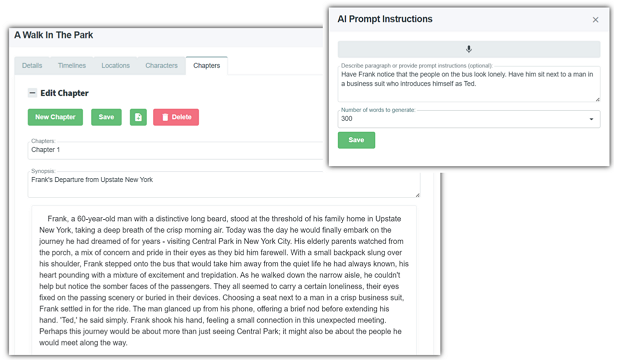
AI Story Builders app preview
AI Writing Assistant
Ready to help

From first spark to final word,
you're never writing alone.

Powered by advanced AI models, our tools support writers every step of the way.

Enhanced Content Generation
✨

Enhanced Content Generation

Input your Characters, Locations, and background information into a database and have the AI use that context when generating new content — every time.

Write Rewrite Describe
💬

AI Writing and Inspiration

Beat writer's block. The software can automatically continue your story or rewrite existing parts according to your instructions — sparking ideas and overcoming creative hurdles.

📚

Story Management

Our proprietary database organizes your story into Timelines, Locations, and Characters. Each Section in each Chapter is associated with these — so the AI stays on track, even through flashbacks.

INEXPENSIVE

The most cost-effective way to write with AI

This free program lets you pay only wholesale rates to use the OpenAI API. Costs typically range between $1 and $5 a month.

Start Writing Today
No credit card required for software
FAQs

Frequently asked questions

How do I install AI Story Builders?
You can use the Online Web Browser Version or install the Windows Desktop Version from the Microsoft Store. See Before you start for what you need.
How do I write my first story?
Click New Story, give it a title and a short synopsis, and the AI drafts the characters, locations, timelines and chapters for you. Read Create a story to get going in minutes.
How is AI Story Builders different from other AI tools?
AI Story Builders keeps your novel in a story database of Timelines, Locations, and Characters. Every Section is associated with these, letting the AI stay on track — even through flashbacks and complex plots. See How it works.
Can I control the AI's writing style?
Yes. Pick a Style and edit the System Message in the story details, or give the story your writing voice with a lexical fingerprint so generated content matches the tone, voice, and pacing of your own prose.
How do I organize chapters and sections?
Stories are broken into Chapters and Sections, and you can record World Facts for context the AI should always know.
Can I chat with the AI about my story?
Yes — use Chat to brainstorm, ask questions about your story, and get suggestions grounded in your characters, locations, and timelines. The chat can propose changes, but nothing changes until you click Apply.
Where do I configure my API key and preferences?
Open Settings to connect an AI provider (OpenAI, Azure OpenAI, Anthropic, Google AI or Ollama) and choose your models. You can also review activity in the Logs.
Can I import an existing manuscript?
Yes. Import an existing manuscript (.docx, .pdf, .txt or .md) and the AI splits it into chapters and sections and finds the characters, locations and timelines.
Can I fine-tune the AI?
Fine-tuning is no longer part of AI Story Builders. To have the AI write like you, give the story your writing voice; for background facts, build a knowledge base.
How are prompts constructed?
When it writes a section, the AI gets the chapter synopsis, the sections before it, the section's characters, location and timeline, your World Facts, and — when you choose — notes from your knowledge base and your writing voice. See Generate a section with AI.
Is it really free to try?
Yes. The software is free. You pay only wholesale rates directly to your AI provider — typically $1–$5 per month — or nothing at all with a local Ollama model. Full documentation is available in the AI StoryBuilders user guide.
An unhandled error has occurred. Reload 🗙